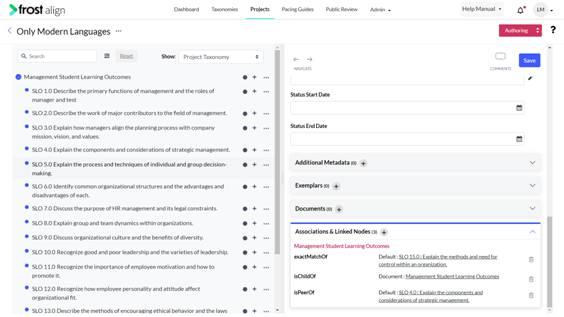
Using Linked Node list to Derive Data
How to use linked node list to derive data?
- Login to access the application. Home screen is displayed.
- From the top menu panel, click Projects.
- From the list of projects, select the project you want to edit.
- Once the project details open in the panel, select Edit Project (the pencil icon beside the search field.)
Select any taxonomy to work on. - To add from taxonomy, click the ellipsis and select Add from taxonomy.
- To derive data of the node associations with the same taxonomy or for different taxonomies, select the Associations & Linked Nodes.
Note:
- Users can delete “ischildof” relationship from any node and that particular node will be displayed under “Nodes that do not have Parent” section at the bottom of the taxonomy.
- Navigation to associated linked nodes is now improved by using auto scroll.
- It is implemented to navigate through associated linked nodes of the taxonomy.